Keeping score is not hard. Keeping score without a conversation about it is.
Almost every scoring dispute traces back to a decision that was made before the first round and never announced: a point value nobody wrote down, a bonus that turned out to apply to one team, a scorer with a different idea about what a “round” was. A scoreboard cannot fix a disagreement about the rules. It can only make an agreed rule visible while it is being applied.
Where Paper Breaks Down
Whiteboards and paper are fine for two teams and one room. They stop working in specific situations:
- Several people updating at once. A whiteboard has one surface; two scorers means one waits or one is ignored.
- A projected display. Paper does not scale to a wall you want the whole room to read.
- Recurring sessions. A weekly league needs a running total, which is where manual tallies reliably go wrong.
- An audience who should see the standings. A trivia room wants to know who is leading without asking.
A live scoreboard fixes the mechanics of all four. It does not fix anything about the rules.
Set the Rules Before the First Point
This is the part that determines whether the session is smooth, and it takes two minutes.
Write the point values down and display them. One point for a correct answer, three for a bonus, minus one for a wrong answer. The values matter less than the fact that everyone has seen them.
Define the unit. A “round” is a question, a category, a set, or a whole game. This is the most common source of confusion, particularly where the scoring unit is a natural pair like a set of tennis.
Decide how ties break before you need to. A draw is a flat end. Agree a tiebreaker in advance — a coin flip, a sudden-death question, or simply a shared place.
Say who is scoring. Not who is allowed to score, but who is doing it. A session with a named scorer has a reference; a session with several has a conversation.
Running the Session
Add the teams first. One per line. Use distinguishable names — three teams called “Blue” will produce a dispute that has nothing to do with points.
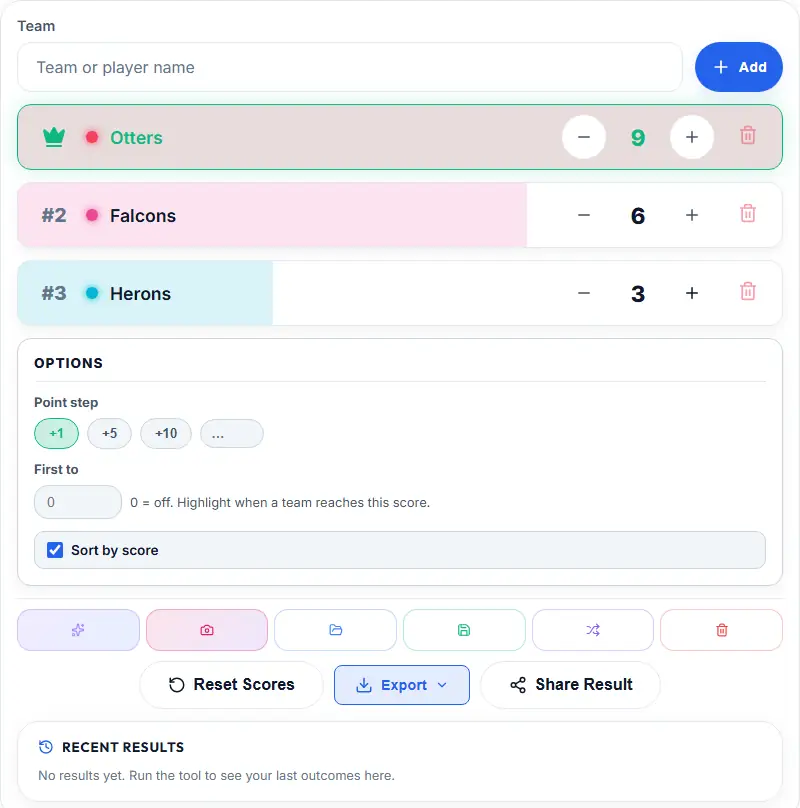
Set a target if you have one. The scoreboard supports a first-to-N condition, which shows which teams are close and gives the session a finish line. For an open-ended quiz, leave it off.
Update after each unit, not at the end. Batch scoring at the end is where arithmetic mistakes happen, and a mistake corrected immediately is not a dispute.
Announce the running order when it changes. The list re-sorts automatically as scores change. Say the new order aloud at the end of each round and nobody has to be the one noticing.
Lock the round before starting the next. A stated close is what makes a later “you gave that to the wrong team” answerable.
Two Useful Details
Manual reordering. If teams are listed in a fixed order — alphabetical, or by table — the scoreboard lets you move them and keeps that order. Auto-sort by score is better for showing standings; fixed order is better when the order itself carries meaning.
Randomising the order. There is a shuffle function for setting up initial order. Worth using when the teams are entering a competition rather than a quiz, since alphabetical seeding in a bracket can hand one side a genuine advantage.
In Classrooms
The strongest classroom use is not a competition but a running total across a term, where paper stops being convenient by week three.
Two practices that help:
Rotate who scores. A student operating the scoreboard is doing something genuinely useful — arithmetic, attention, and trust in the process. And it removes the complaint about a particular teacher favouring a team.
Keep the values visible on the board. Where a point is awarded should be visible to the room, not just to whoever is adding it.
For assigning the work that earns the points, Task Matcher handles the distribution; for choosing who presents the result, the Wheel of Names is the faster option.
For Sports and Casual Games
Sets, goals, and round wins work well, with one caveat: decide what counts as a unit before the first game. In a tennis set, is a tiebreak a game or a set? The answer changes the score, and it is always asked mid-match.
For a fixed number of rounds, a target score makes the finish unambiguous and removes the need to adjudicate a scorer’s count.
Compared With a Spreadsheet
A spreadsheet is more flexible — it calculates, formats, and does anything you can code. It is also slower on a phone, easy to edit accidentally while someone is typing, and its interface does not project to a room.
For a live session, the argument is not really flexibility. It is that a scoreboard’s only job is to show the current standings, and it does that with one tap.
Where a spreadsheet genuinely wins: recording a full season, analysing results, or anything you need to compute on.
A Note on Fairness
The scoreboard records points accurately. It does not make the scoring fair — that is entirely a function of the rules you agreed.
Where you want a decision to be impartial rather than a score to be visible, that is a different tool: the Lucky Draw for picking a winner from a list, the Coin Flip for a genuine two-way tie. Both draw from the browser’s cryptographic random source rather than the predictable Math.random(), which the fairness page explains.
Practical Notes
No account needed. Teams are stored in your browser, so the same device keeps them between sessions. Save the team list if you run a recurring league.
Screenshots at the end. One picture of the final board settles “what was the score” for as long as the result matters.
Reset deliberately. If you run a term-long league, resetting for a new round by accident loses more than a session’s work.
Start a Session
Open the Scoreboard, add your teams, agree the point values out loud, and set a target if the game has one. Everything after that is a single tap per point.