A good giveaway has two parts: the right tool and the right list. Most people prepare them separately. They decide which tool to use, type the names one by one, then adjust the settings. The Magic AI box on the RandomSelect homepage collapses that chain into a single sentence.
The new tool is as simple as a search box: describe what you want to pick, and it chooses the right tool, builds the list and leaves you inside the tool with everything ready. This guide explains what Magic AI actually does, how to get the best results, where it can mislead you, and how it relates to a fair draw.
What Magic AI does
Magic AI is not a separate draw tool. It is an intent layer in front of the tools. It reads one sentence, decides which tool fits, and generates the starting list for that tool. Then it takes you straight there.
These sentences are enough:
- “Giveaway: Ann, Ben, Chris, Dana, Eli, Fay”
- “12 dinner ideas with a wheel”
- “Split into 3 groups: Ann, Ben, Chris, Dana, Eli, Fay”
- “Secret Santa: Ann, Ben, Chris, Dana, Eli, Fay”
- “All 50 US states on a wheel”
- “Start a random quiz for my class”
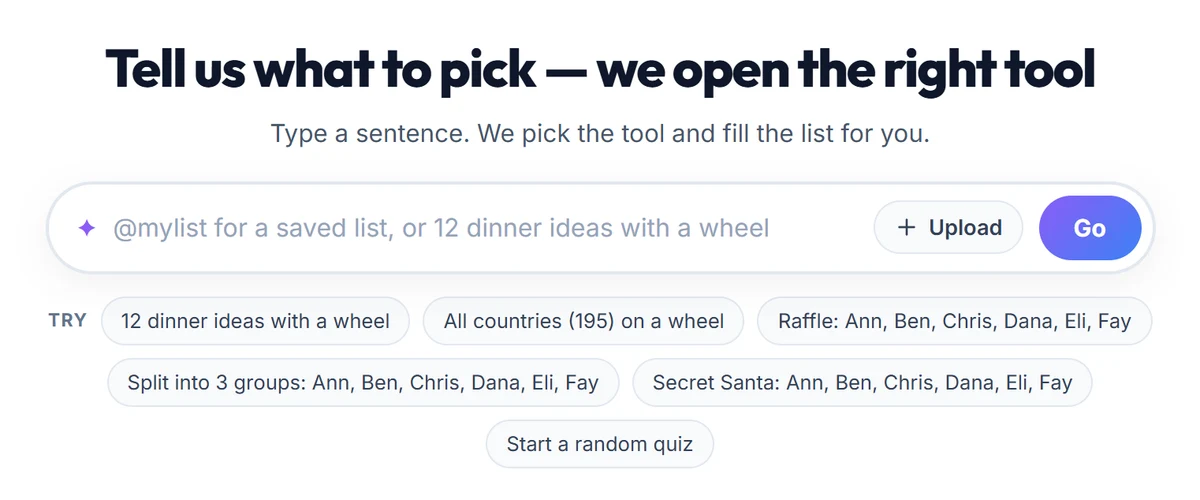
The box resolves common requests in the browser. If you type a clear command such as “wheel” or “giveaway”, it does not wait for a server round trip; the tool opens immediately. The language model is only called when a list genuinely has to be generated. That split is what makes the box feel fast rather than clever.
One sentence, four steps
1. Open the homepage. Go to randomselect.net. You can also press Ctrl + K (Cmd + K on a Mac) anywhere on the page to jump straight into the box.
2. Describe the choice. Write in plain language. Instead of a vague “run a giveaway”, say who or what is being picked and how many winners or groups you need.
3. Check the tool and the list. Magic AI opens the right tool and fills the list. You can edit, add or remove entries in the field. The list stays under your control; the AI only provides the starting point.
4. Run the draw. Use the tool’s own button, such as Lucky Draw or Wheel of Names. The selection is made by the tool’s randomness engine, independently of how the list was created.

What makes a good prompt
The quality of the output depends mostly on the clarity of the sentence. A good prompt answers three questions: what, how many, and with which tool.
| Weak prompt | Why it is weak | Better version |
|---|---|---|
| “Run a giveaway” | No participants, no tool | “Lucky draw: Ann, Ben, Chris, Dana” |
| “Names” | No count, no category | “30 common first names for a classroom” |
| “Make groups” | No people, no group count | “Split into 3 groups: Ann, Ben, Chris, Dana, Eli, Fay” |
| “Pick dinner” | No pool of options | “12 dinner ideas with a wheel” |
| “Quiz” | No topic, no length | “A 10-question random science quiz” |
The pattern is consistent: when the count and the scope are explicit, the result is predictable. Ask for “all 50 US states” and you get all 50. Ask for “some states” and you have no control over either the number or the coverage.
One prompt should also do one job. If you ask for a name list, a team split and a giveaway rule in the same sentence, the router picks the dominant task and drops the rest. Two needs mean two prompts.
Four ways to build the list
Magic AI does not only generate lists from text. There are three more ways to bring in data you already have:
Type it: Put the names or a category directly into the box. Comma-separated lists such as “Ann, Ben, Chris” are recognised and handed to the tool without an AI call.
Use a saved list: Type @ and pick a list from Collections. A sentence like pick 3 winners from @team moves your saved list straight into the draw. This is the fastest route for recurring class, team or customer lists.
Scan a photo: Upload a photo of a participant list. The From photo (OCR) option reads the names. It supports up to 100 participants per photo. Always check the result when the image is small, angled or blurry.
Import a file: Upload a CSV or TXT file. The first value on each line is treated as the participant name; remove any header row before uploading. If you have an Excel file, export it as CSV first.

All four methods end the same way: the tool opens with a prepared list. Which one you choose depends on where the data already lives.
How it differs from Fill with AI
RandomSelect has two ways to generate a list, and they are designed for different moments.
Fill with AI lives in the toolbar inside a tool. You have already chosen the tool; only the list is missing. Click the button, describe the list, and the field is filled. It is built for working inside a tool.
Magic AI sits on the homepage and runs before any tool is open. You do not need to know which tool to use. Your sentence determines both the tool and the list. It is the most practical starting point when the question is still “giveaway, wheel, groups or Secret Santa?”
In short: use Fill with AI when you are already inside a tool and need a list; use Magic AI when nothing is open yet. For the full list-generation playbook, see the AI list generation guide.
Where Magic AI is most practical
Quick giveaways. If you have six names and five minutes, opening Lucky Draw with one sentence is the shortest path. No setup, account or app install.
Classroom activities. Prompts such as “12 dinner ideas with a wheel” or “split into 3 groups: …” make it easy to start an activity in the last five minutes of a lesson. Teachers reach for Wheel of Names and Group Maker most often.
Team and meeting tasks. Task assignments, presentation orders and brainstorming lists can be generated in one sentence instead of typed by hand. Showing the list in the meeting and editing it together is faster than starting from a blank field.
Holiday and gift draws. The sentence “Secret Santa: …” opens the Secret Santa tool. Pairing rules can then be adjusted inside the tool.
Testing and demos. If you want to try a tool with a large roster, generating a temporary 200-name list takes seconds. Clear it when you are done.
The limit that matters: AI lists are not real participants
This section exists to state the most important limitation clearly.
Magic AI generates content, not real participation. If you are running a prize draw and announcing the winner publicly, every name in the pool must belong to a real person who entered. A generated “Elif Yilmaz” is not a participant; it is a plausible name.
The same applies to:
- If you already have a participant list, import it by photo or CSV instead of regenerating it.
- Check the output for legal entities, official categories or any list that must be verified.
- Do not ask AI to produce names that must match a third-party registration system.
- Before uploading a photo with personal data, make sure you have the right to do so; the image is sent to a server for processing.
There are technical limits too: prompts are capped at 500 characters, list size depends on the tool (up to 300 entries for the wheel and Lucky Draw), photo recognition supports up to 100 participants, and only CSV/TXT files are accepted. Free usage may have a daily AI quota; Premium offers unlimited AI for heavy use.
Three rules for a fair draw
Magic AI prepares the list; whether the selection is fair is a separate question. Protect three things:
- Freeze the pool. Lock the participant list before the draw starts. Adding or removing names during the draw makes the result impossible to defend.
- Use a cryptographic selection. RandomSelect draws with the browser’s
crypto.getRandomValues()source, not the predictableMath.random()function most web tools use. - Keep a record. Publish the winner, the list and the time of the draw. A record you can show is stronger than a verbal assurance.
You can read the full mechanism on the fairness page. In short: AI builds the list, and the tool’s secure randomness engine makes the choice. Keeping those two jobs separate produces a better and more defensible giveaway.
Frequently asked questions
Is Magic AI free? Yes, basic use is free and does not require an account. Free usage may have a daily AI quota. For unlimited AI, larger lists and extra features, see Premium.
Does it work on my phone? Yes. Magic AI runs in the browser, with no app to install. Open the homepage and type your sentence.
Does an AI-generated list make a giveaway fair? No. The list only defines the pool. Fairness depends on drawing from a fixed pool with cryptographic randomness. For a giveaway with real participants, do not generate the participant list with AI.
Which languages are supported? The site works in 12 languages: English, Turkish, German, French, Spanish, Portuguese, Russian, Arabic, Hindi, Chinese, Japanese and Korean. The output follows the language of your prompt.
Can I upload an Excel file?
.xlsx is not supported directly. Save your Excel file as CSV and upload that. The first column of each row is used as the participant name. For more detail, see the participant list workflow.
Why is the prompt limited to 500 characters? Short prompts produce clearer results and keep response times low. To bring in a long participant list, use the CSV or photo option instead of pasting it into the box.
What if it opens the wrong tool? Make the sentence more specific: name the tool (“wheel”, “lucky draw”, “group maker”) and include the list. For example, “12 desserts on a wheel” is more reliable than “12 desserts”.
Bottom line: one sentence, a ready giveaway
Magic AI removes the step people most often skip: choosing a tool and filling the list. You say what you want to pick; the platform handles the rest. For teachers, team leads and event organisers who need an activity running in five minutes, that is a meaningful time saving.
Convenience is not the same as fairness, though. For a real giveaway, build the list from real participants, freeze the pool and let the tool’s secure randomness make the choice. Magic AI speeds up the beginning; the credibility of the result still depends on the process you set up.
Try it now: open the homepage, write one sentence, and start your draw.