You have a great collection of random tools — but switching between tabs breaks the flow. The Random Board solves that: it puts every tool on one screen so you can run them together, side by side, without losing context.
This guide explains what the Random Board is, how to build your first board in under a minute, and how to get the most out of it in classrooms, events, meetings and game nights.
Why a single screen changes everything
When you use one tool at a time, you constantly jump between pages, copy results back and forth, and lose the rhythm of the moment. A multi-tool workspace fixes the common pain points:
- You can watch a Wheel of Names spin while the Scoreboard tracks points on the same screen.
- A Stopwatch runs alongside a Dice Roller without interrupting the game.
- Results stay visible in real time, so nobody has to ask “who was winning again?”
The Random Board is a blank canvas designed for exactly these situations.
What is the Random Board?
The Random Board is a free workspace where you add tools as cards onto a grid. Each card runs a full tool — the same ones you find on the site — and you can arrange, resize and remove them however you like.
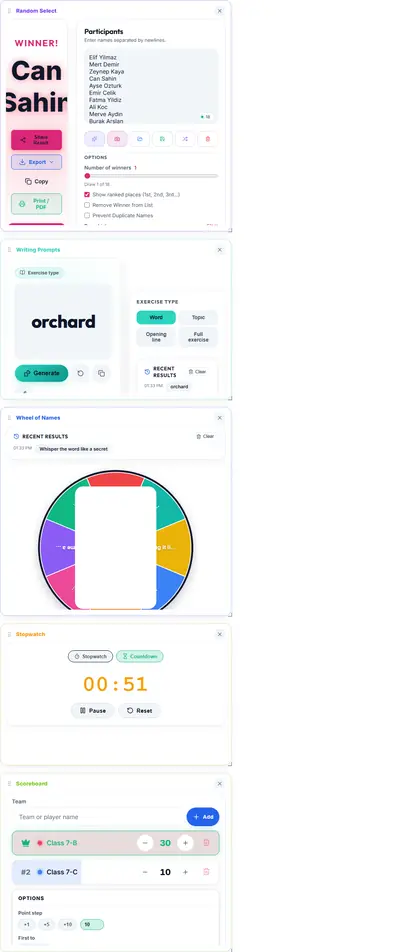
There is nothing to install and no account to create. Your board and its layout are saved in your browser, so the next time you open the page, everything is exactly where you left it.
The 14 tools you can combine
Every Random Select tool is available as a card, so the combinations are up to you. The full list:
- Wheel of Names — spin to pick a name or item in style
- Random Select — pick a winner with animated draws
- Coin Flip — a realistic 3D coin for fair decisions
- Dice Roller — roll multiple virtual dice
- Random Number — fair draws from any range
- Scoreboard — an auto-sorting live leaderboard
- Group Maker — split a list into random, fair teams
- Task Matcher — assign tasks to people fairly
- Weighted Raffle — give everyone a different chance to win
- Bracket — build tournament brackets step by step
- Gift Pick — run a secret santa exchange
- Orbital Battle — an animated battle-royale eliminator
- Classroom Seater — generate fair seating charts
- Stopwatch — precise timing with laps and a countdown
Mix them freely. A classroom session, for example, might pair the Wheel with the Scoreboard; a raffle might combine the Weighted Raffle with a countdown timer.
How to build your first board
Open the Random Board and follow these steps:
- Choose your tools. In the toolbar, tap the tools you want — each one appears instantly on the grid.
- Add a specific layout. Drag a tool from the toolbar directly onto the grid to place it where you want it.
- Arrange the cards. Drag a card’s header to move it anywhere on the board.
- Resize the cards. Use the edges or corner of a card to make it wider, taller, or both.
- Remove what you don’t need. Press the × on any card, or use Clear to reset the whole board.
There is no wrong way to set it up. Start with the tools you use most and adjust as you go.
Arrange, resize and reorder
The board is built around the idea that no two sessions are the same:
- Move any card by dragging its header — a drop marker shows exactly where it will land.
- Resize to fit your screen — a wide window can show two or three cards comfortably, while a projector screen can hold even more.
- Reorder anytime — your layout is saved automatically, so a board you set up for Friday’s lesson is ready when Friday comes.
Dragging a card outside the board removes it, which makes tidying up a single gesture.
Real-world uses
Classrooms
Run a quiz with the Wheel of Names for picking students and the Scoreboard for points on the same screen. When it is time to form groups, add a Group Maker or a Classroom Seater without switching tabs.
Events and giveaways
Combine the Random Select or Weighted Raffle with a live countdown timer. The audience watches the draw and the clock together — everything stays transparent and verifiable.
Meetings and decisions
Pair the Coin Flip with a Task Matcher to settle decisions and assign follow-ups in one go. For debates, a Bracket keeps the structure visible while a Stopwatch keeps each round on schedule.
Game nights and sports
Set the Dice Roller next to the Scoreboard for board games, or run a mini-tournament with the Bracket and track every match live. For a lively tie-breaker, add an Orbital Battle.
Privacy and saving
Everything happens in your browser. Lists, settings and board layouts stay on your device — there is no account, no signup and no data sent to a server. That keeps the board fast, private, and free to use for classrooms, offices and personal projects alike.
Tips for smooth sessions
- Set up the board before the session starts so you can focus on the moment, not the setup.
- Resize cards so the most important tool gets the most screen space.
- Clear the board between sessions — it keeps results from one activity from confusing the next.
- Test the tools once with sample data so you know exactly what each card does.
- Use the saved layout to reuse the same setup every week without rebuilding it.
Build your Random Board now
The Random Board is free, works on any device, and takes less than a minute to set up. Open it for your next class, event, meeting or game night — and keep every tool you need in front of you, on one screen.